


Group Controls
The group management screen provides controls that affect every strobe assigned to that group.
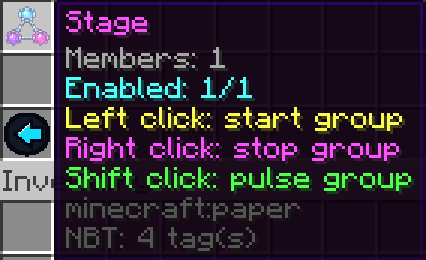
Available actions include:
Start
Starts every strobe in the group.
Each light continues using its own configuration.
For example, a group can contain:
Red Static Light
Blue 2 flashes/s Strobe
Purple 10 flashes/s Strobe
White Static Light
Starting the group activates all of them while preserving their individual modes and settings.
Stop
Stops every strobe in the group.
Their configurations remain saved and can be started again at any time.
Toggle
Toggles the current state of the group’s strobes.
This control is available from both the GUI and commands.
Test Pulse
Sends a test pulse to all strobes in the group together.
This is useful for testing complete lighting areas or checking multiple sources without permanently starting them.