


RGB Intensity
RGB Intensity controls the brightness of the 3D RGB light.
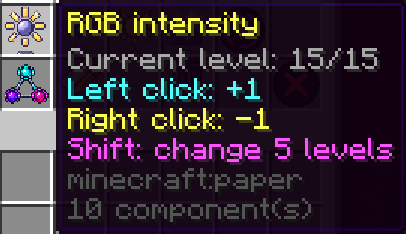
Its range is:
0/15 → 15/15New strobes use:
15/15by default.
Intensity Levels
At:
0/15the RGB environmental light is effectively off.
At:
15/15the RGB light operates at maximum brightness.
Values between them allow progressively lower light levels.
RGB Intensity does not control the physical size of the light. Use RGB Light Size when you want to make the illuminated area larger or smaller.
Adjusting RGB Intensity
From the strobe editor:
Left Click
+1 levelRight Click
-1 levelShift + Click
Change by 5 levelsThe GUI displays the current value directly:
RGB intensity
Current level: 15/15
Using Commands
The command equivalent is:
/strobe set <name> brightness <0-15>For example:
/strobe set Entrance brightness 8Although the command uses the term brightness, the setting is displayed as RGB Intensity in the GUI.
Real-Time Adjustment
RGB Intensity updates in real time.
If the light is already running, changing the value immediately changes its brightness without requiring the strobe to be restarted.
The setting works in both:
Strobe Mode
Static Mode