


Free Placement
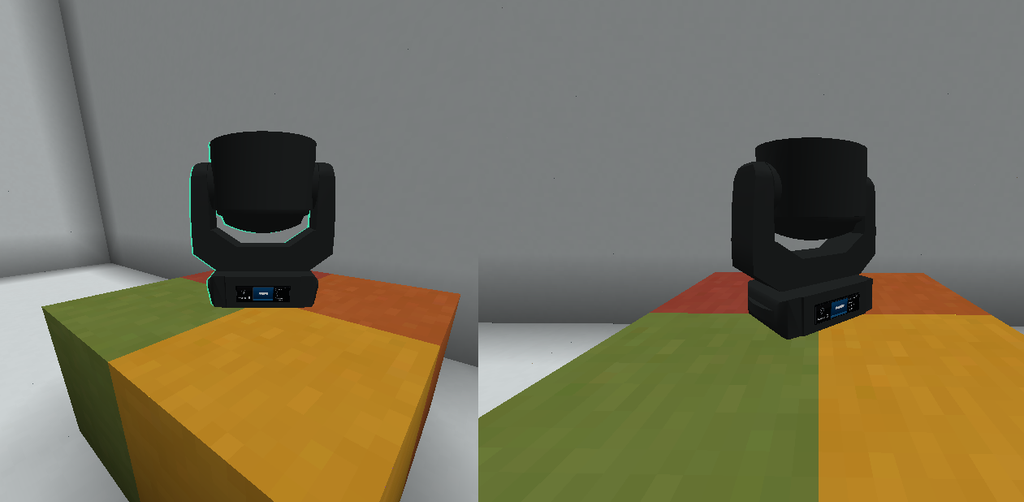
Free Placement is a fixture-placement system introduced in Theatrical: Realistic Pack (TRP) 0.15.X.
It allows compatible fixtures to be positioned more precisely on ordinary horizontal Minecraft surfaces instead of always being forced to the exact centre of a block.
The fixture follows the precise cursor position used during placement, while TRP previews the real fixture model before the placement is confirmed.
Overview
| Feature | Free Fixture Placement |
| Introduced | TRP 0.15.X |
| Configuration Option | freeFixturePlacement |
| Default | ✅ Enabled |
| Precise Positioning | ✅ Yes |
| Placement Preview | ✅ Yes |
| Model-Based Preview | ✅ Yes |
| Persistent Position Offset | ✅ Yes |
| Persistent Rotation | ✅ Yes |
| Multiplayer Synchronisation | ✅ Yes |
| Horizontal Surfaces | ✅ Supported |
| Partial-Height Surfaces | ✅ Supported |
| Wall Placement | ❌ Not added by Free Placement |
| Compatible Truss Snapping | ✅ Preserved |
| Global Keybind Required | ❌ No |
How Free Placement Works
Normally, Minecraft blocks are positioned according to the game’s block grid.
With Free Placement enabled, a TRP fixture placed on an ordinary horizontal surface can use the exact position of the player’s cursor as its placement point.
Instead of always appearing in the centre of the Minecraft block, the fixture can therefore be positioned more precisely within the available surface area.
Using Free Placement
No special tool or keyboard shortcut is required.
To place a fixture:
- Hold the fixture item.
- Aim at the desired supported surface.
- Move the cursor to the exact location where the fixture should be positioned.
- Check the placement preview.
- Use the normal Minecraft placement interaction.
- The fixture is placed using the selected position and orientation.
The preview updates as the cursor moves across the surface.
Supported Surfaces
Free Placement applies to ordinary horizontal block surfaces.
This includes normal full blocks as well as partial-height surfaces such as:
- Slabs
- Carpets
- Other compatible horizontal surfaces
The clicked block provides the mounting plane while the cursor position determines the fixture’s precise offset.
Positioning
Free Placement allows the fixture to store a continuous offset rather than using only the centre of its Minecraft block position.
The saved placement pose includes:
- X offset
- Y offset
- Z offset
- Yaw
- Pitch
- Roll
This allows the rendered fixture to remain positioned consistently even after saving and reloading the world.
Initial Orientation
When a fixture is freely placed, its initial yaw is calculated so that the fixture faces the player.
This provides a predictable starting orientation when placing equipment onto a stage or other horizontal surface.
Floor and Ceiling Placement
Fixtures placed on floor or ceiling surfaces remain level.
Free Placement does not automatically tilt a fixture simply because the player is looking upward or downward during placement.
The system separates the player’s viewing direction from unnecessary physical pitch or roll of the fixture.
Wall Placement
Free Placement does not introduce a general wall-mounting system.
Using Free Placement on ordinary surfaces should therefore not be interpreted as allowing every fixture to attach freely to vertical walls.
Wall and support behaviour continues to depend on the fixture and the supported mounting system.
Placement Preview
Before the fixture is placed, TRP renders a live preview.
This preview uses a temporary instance of the actual fixture model rather than only displaying a simple Minecraft block outline.
The preview includes:
- Fixture geometry
- Model transformations
- Current position
- Current orientation
- A translucent silhouette around the model
- Placement-validity feedback
This makes it easier to see exactly where the real fixture will appear before confirming the placement.
Valid Placement
When TRP determines that the target position can be used, the preview displays a:
Green / teal validity indication
This means the fixture can be placed at the currently previewed position.
Obstructed Placement
If the fixture cannot fit correctly at the selected location, the placement preview changes to:
Red
This indicates that the current target is obstructed or otherwise invalid.
Move the cursor or choose another position until the preview becomes valid.
Model-Based Collision
The Free Placement system does not only move the visual model.
The stored fixture pose is also used for its:
- Collision bounds
- Selection bounds
This helps ensure that interaction and selection remain aligned with the visible fixture.
Optical Position
The complete Free Placement transform is shared by the fixture’s lighting systems.
This includes:
- Fixture body
- Optical origin
- Beam origin
- Volumetric beam
- Projection
- Impact light
- Raycast calculations
This prevents situations where a fixture is visually moved away from the centre of its block but its beam still originates from the old block-centre position.
Persistent Placement
Free Placement data is persistent.
The saved position and rotation survive:
- World saving
- World loading
- Block-entity updates
- Multiplayer synchronisation
The fixture should therefore return to the same precise placement after the world is reloaded.
Multiplayer
Free Placement is synchronised between the server and connected clients.
The complete fixture pose is transmitted so that players see the same:
- Fixture position
- Fixture orientation
- Collision
- Beam origin
- Projection origin
This prevents the fixture body and lighting output from being displayed differently between clients.
Truss Placement
Free Placement does not replace TRP’s existing truss mounting system.
When a fixture is placed onto a recognised compatible support, the normal snapped mounting behaviour continues to be used.
This includes supported structures such as TRP’s F34 system and other recognised compatible rigging supports.
In simple terms:
Ordinary horizontal surface
→ Free Placement

Compatible truss / rigging support
→ Normal TRP mounting and snapping
Configuration
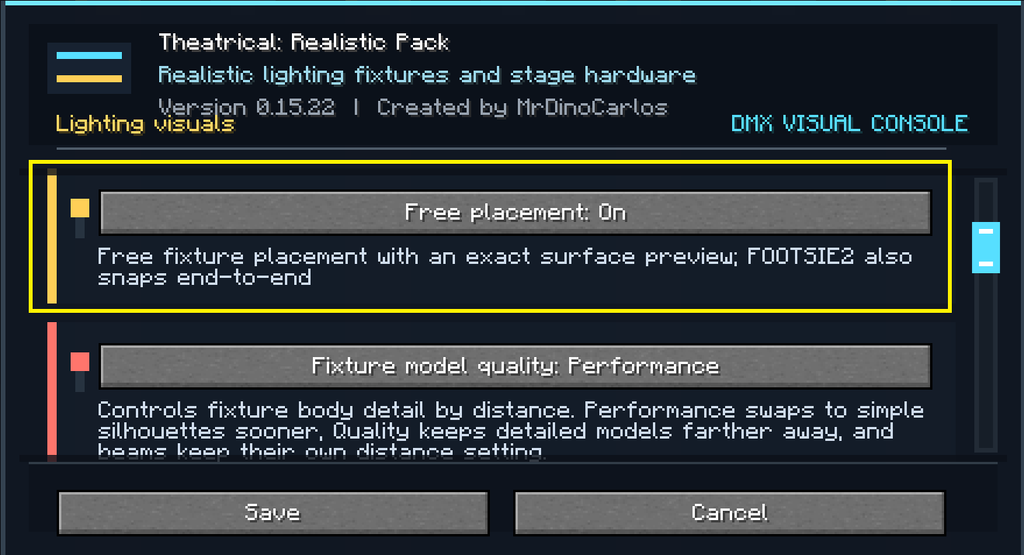
Free Placement can be enabled or disabled through the TRP client configuration.
Configuration option:
freeFixturePlacement
Default:
true
Disabling Free Placement
When freeFixturePlacement is disabled, ordinary non-truss fixture placement returns to the standard Minecraft-style placement behaviour.
Compatible truss mounting continues to use the normal TRP support system.
No New Keybind
Free Placement does not add a global TRP keyboard shortcut.
There is no dedicated:
- Placement key
- Position key
- Rotation key
- Preview key
Simply aim at the desired surface and use the normal fixture placement interaction.
Placement Corrections in 0.15.X
The 0.15.X implementation also improves the internal consistency of freely placed fixtures.
The same saved pose is now used throughout the fixture rendering and lighting systems.
This corrects problems such as:
- Detached beams
- Beams remaining at the original block centre
- Incorrect optical origins
- Misplaced impact lights
- Incorrect raycast positions
- Incorrect projections
- Side-selection problems on freely placed fixtures
- Incorrect PATT model orientation
Recommended Workflow
For precise fixture placement:
- Enable
freeFixturePlacement. - Select the desired fixture.
- Aim at the intended horizontal surface.
- Move the cursor until the fixture is positioned correctly.
- Check that the preview is green / teal.
- Confirm placement.
- Adjust the fixture further using its normal physical or configuration controls where applicable.
- Use the normal truss system instead when mounting on compatible rigging.
Important
Free Placement changes the physical placement pose of a fixture.
It does not change:
- Theatrical Network
- DMX Universe
- DMX Address
- Fixture Personality
- DMX Pan
- DMX Tilt
- Focus Tool targets
- FollowMe targets
- RoboSpot configuration
These remain separate fixture-control systems.