


HolyPATT


The HolyPATT is a static tungsten-style PATT luminaire implemented in Theatrical: Realistic Pack (TRP).
Unlike PATT 2017 and pixelPATT, HolyPATT does not use the RGBW pixel personalities of the PATT Driver. Instead, it operates through a dedicated HolyPATT Dimmer personality with a single DMX channel.
Its rendered output has an approximately 1800 K warm tungsten-style appearance, and the fixture must be linked to a PATT Driver to receive its controlled output.
Official Resources
ROBE Lighting
Official product information and documentation for the PATT family are available from ROBE Lighting.
HolyPATT is part of ROBE’s scenic PATT family.
Overview
| Manufacturer | ROBE |
| Fixture Type | Static Tungsten-Style PATT Luminaire |
| Colour Appearance | Approx. 1800 K |
| Control Type | External Dimmer |
| DMX Personality | HolyPATT Dimmer |
| DMX Channels | 1 |
| Direct DMX Input | ❌ No — controlled through PATT Driver |
| PATT Driver Required | ✅ Yes |
| Maximum Driver Distance | 10 blocks |
| Maximum Fixtures per Driver | 16 |
| Manual Pan / Tilt | ✅ Yes |
| Free Placement | ✅ Yes |
| Truss Mounting | ✅ Yes |
| Truss Mount Tool | ✅ Yes |
| Focus Tool | ❌ No |
| Custom Gobos | ❌ No |
| RoboSpot | ❌ No |
| FollowMe | ❌ No |
| Dedicated Flight Case | ❌ No |
| Survival-Friendly Carrying | ❌ No |
DMX Modes
HolyPATT does not use the seven RGBW / pixel personalities available to PATT 2017 and pixelPATT.
When a PATT Driver is configured for HolyPATT, its normal personality list is replaced by:
| Personality | Channels |
|---|---|
| HolyPATT Dimmer | 1 |
This single channel controls the fixture’s intensity.
HolyPATT Dimmer
HolyPATT uses a deliberately simple control model.
The PATT Driver receives the configured DMX channel and applies the resulting dimmer value to every linked HolyPATT in that Driver group.
The fixture retains its warm tungsten-style appearance while its intensity changes according to the incoming dimmer level.
Implemented Functions
The HolyPATT implementation includes:
- Warm tungsten-style output
- Approximate 1800 K visual appearance
- External dimmer control
- PATT Driver linking
- Theatrical network integration through the Driver
- DMX Universe and Address through the Driver
- Manual physical Pan / Tilt aiming
- Free Fixture Placement
- Compatible truss mounting
- Truss Mount Tool support
- Persistent Driver linking
HolyPATT does not use the RGB, RGBW, pixel, pattern or effect personalities used by the other supported PATT models.
PATT Driver
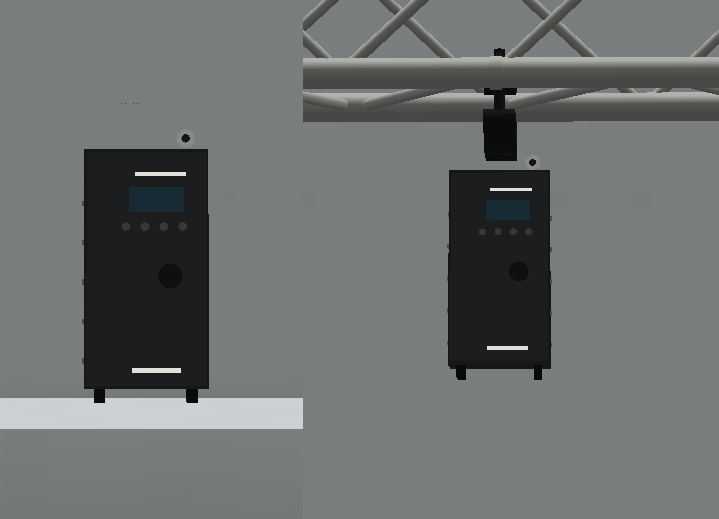
HolyPATT requires a PATT Driver for controlled operation.
The Driver manages:
- Theatrical Network
- DMX Universe
- DMX Address
- Target fixture selection
- HolyPATT Dimmer personality
- Distribution of dimmer output to linked HolyPATT fixtures
The PATT Driver itself acts as the controller and does not generate a lighting output of its own.
Linking to a PATT Driver
HolyPATT fixtures are linked through the dedicated PATT Driver interface.
The Driver searches for compatible PATT fixtures within a spherical range of:
10 blocks
One Driver can control up to:
16 fixtures
simultaneously.
Same-Model Requirement
All fixtures connected to a single PATT Driver must belong to the same PATT model.
A valid HolyPATT configuration could therefore look like:
PATT Driver
├── HolyPATT
├── HolyPATT
├── HolyPATT
└── HolyPATT
✅ Valid
The following is not permitted:
PATT Driver
├── HolyPATT
├── PATT 2017
└── pixelPATT
❌ Invalid
A single Driver target selection cannot mix:
- HolyPATT
- PATT 2017
- pixelPATT
Driver Ownership
A HolyPATT that is already linked to another PATT Driver cannot simultaneously be selected by a second Driver.
The Driver interface identifies fixtures that are already controlled by another Driver so they cannot be claimed twice.
Link Persistence
PATT Driver links are stored persistently.
If a linked HolyPATT temporarily becomes unloaded, TRP can restore the link when the relevant blocks are loaded again, provided:
- The original Driver still exists.
- The fixture remains within the valid connection range.
- The fixture remains compatible with the Driver configuration.
Unlinked Behaviour
A HolyPATT without a valid PATT Driver connection does not produce its normal Driver-controlled output.
Interacting with an unlinked PATT fixture can provide information indicating that it requires configuration through a PATT Driver.
Fixture Configuration
HolyPATT does not use the same independent DMX configuration workflow as a conventional TRP fixture.
Its primary control configuration is stored on the linked PATT Driver.
The Driver defines:
- Theatrical Network
- DMX Universe
- DMX Address
- HolyPATT Dimmer personality
- Linked HolyPATT fixtures
The HolyPATT acts as the physical output device for that configuration.
PATT Driver Interface
The PATT Driver screen displays nearby PATT fixtures and information including:
- Fixture model
- Block coordinates
- Distance
- Link status
- Whether another Driver already controls the fixture
- Compatibility with the current Driver target type
Players can select or remove compatible HolyPATT fixtures and save the resulting configuration to the server.
Manual Aiming
HolyPATT is a static fixture rather than a motorised moving head.
It supports manual Pan / Tilt adjustment for physically aiming the fixture.
This manual orientation is separate from its DMX dimmer control.
The PATT Driver controls intensity while the fixture’s physical orientation determines where the luminaire is aimed.
Free Placement
HolyPATT supports TRP’s Free Fixture Placement system.
When placed on an ordinary horizontal surface, its exact cursor position determines the fixture’s placement offset instead of forcing it to the centre of the Minecraft block.
TRP shows a preview using the actual fixture model before placement.
The preview indicates placement validity:
- Green / teal — valid placement
- Red — obstructed placement
The complete placement pose is stored persistently, including:
- Position offset
- Yaw
- Pitch
- Roll
The fixture body, collision, optical origin and rendered lighting use the same stored transform.
The 0.15.X implementation also corrects the initial front-facing orientation of the PATT-family models when using Free Placement.
Focus Tool
HolyPATT is not compatible with the Focus Tool.
Its physical orientation is adjusted manually instead of using TRP’s multi-fixture focusing system.
RoboSpot
HolyPATT is not compatible with RoboSpot.
It cannot be used as a RoboSpot camera or remote followspot target.
FollowMe
HolyPATT is not compatible with FollowMe.
It cannot be selected by a FollowMe Tracker for automatic player or entity tracking.
Custom Gobos
HolyPATT does not implement a serviceable gobo system.
It therefore does not support:
- Gobo Service Screwdriver
- Factory gobo replacement
- Custom engraved gobos
Flight Cases
HolyPATT has no dedicated functional TRP Flight Case in the current implementation.
Survival-Friendly Carrying
HolyPATT is not included in TRP’s Survival-Friendly physical fixture-carrying system.
It does not use the carried-fixture entity workflow implemented for supported fixture models.
Rigging & Mounting
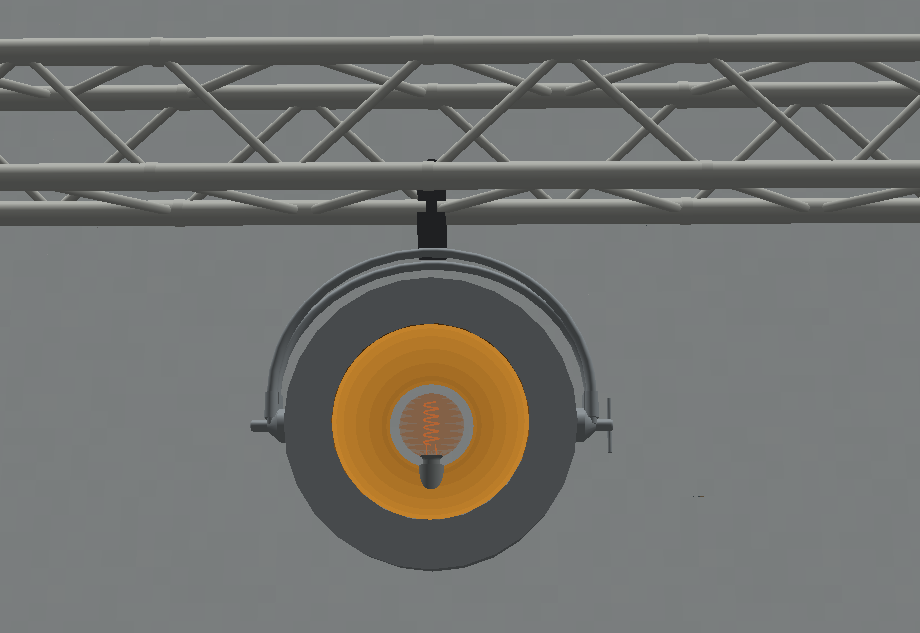
HolyPATT supports TRP’s compatible hanging and rigging infrastructure.
It can be used with:
- F34 truss
- Compatible Theatrical truss and rigging structures
- Recognised compatible support systems
- Free Placement on ordinary supported horizontal surfaces
HolyPATT also supports the Truss Mount Tool.
Truss Mount Tool
When HolyPATT is installed on a valid horizontal F34 side mount, the Truss Mount Tool can adjust its physical mounting orientation.
The available angle range is:
0°–120°
in:
15° increments
The tool can also switch between:
- Rail A
- Rail B
when the selected support exposes both rails.
These settings change the physical installation of the fixture and are separate from its DMX control.