


BMFL Spot
The ROBE BMFL Spot is a moving spot fixture implemented in Theatrical: Realistic Pack (TRP).
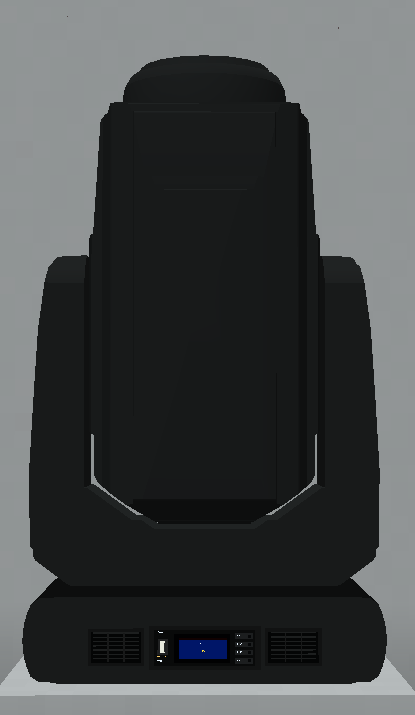

Its TRP implementation combines detailed colour control, two serviceable gobo wheels, projected gobos, focus, zoom, frost, prism and effect functionality with smooth movement and output behaviour.
BMFL Spot is also compatible with Focus Tool, Custom Gobo Service, RoboSpot y el FollowMe, making it one of the most extensively integrated fixtures currently available in TRP.
Official Resources
ROBE Product Page
https://www.robeuk.com/bmfl-spot
Official GDTF Profile
ROBE provides official manufacturer-maintained GDTF fixture data for the BMFL Spot.
Search for:
BMFL Spot
Manufacturer:
Robe Lighting s.r.o.
Whenever possible, use the GDTF profile published directly by ROBE rather than a community-created version.
The official ROBE BMFL Spot product page includes GDTF support among its fixture resources.
Overview
| Manufacturer | ROBE |
| Fixture | BMFL Spot |
| GDTF / Search Name | BMFL Spot |
| Type | Moving Spot |
| TRP Status | Implemented |
| DMX Footprints | 7 / 41 / 33 / 10 channels |
| Focus Tool | ✅ Supported |
| Custom Gobos | ✅ Supported |
| RoboSpot | ✅ Supported |
| FollowMe | ✅ Supported |
| Dedicated Flight Cases | ❌ Not Available |
| Documentation Verified | TRP 0.13.7 |
BMFL Spot supports all four of TRP’s main fixture interaction systems: Focus Tool, Custom Gobos, RoboSpot and FollowMe.
DMX Modes
The BMFL Spot currently includes the following TRP personalities:
| Mode | Channels |
|---|---|
| Theatrical | 7 |
| Mode 1: Standard 16-bit | 41 |
| Mode 2: Reduced 8-bit | 33 |
| Theatrical Gobos | 10 |
The selected personality determines the available fixture controls and the total DMX footprint.
Mode 1: Standard 16-bit
The main detailed BMFL Spot personality.
It occupies 41 DMX channels and provides the higher-resolution movement/control workflow.
Mode 2: Reduced 8-bit
A reduced 33-channel personality for installations where the complete Standard 16-bit footprint is not required.
Theatrical
A compact 7-channel personality intended for simpler control through the TRP/Theatrical workflow.
Theatrical Gobos
A compact 10-channel personality providing simplified control with gobo functionality.
For example, a BMFL Spot using Mode 1 at Address 1 occupies:
Channels 1–41
Exact DMX channel-value ranges are not included unless separately validated against the complete personality implementation.
Implemented Functions
The BMFL Spot implementation includes:
- Pan and Tilt
- Smooth movement
- Dimmer
- Shutter / Strobe
- Colour control
- Serviceable Gobos
- Gobo projection
- Gobo indexing
- Gobo rotation
- Gobo movement effects
- Focus
- Zoom
- Frost
- Prism
- Prism / effect functionality
- Fixture-specific optical effects
- RoboSpot operation
- FollowMe automatic tracking
The exact controls available depend on the selected DMX personality.
Fixture Configuration
Interact with the BMFL Spot using an empty hand to open its physical fixture display.
The common TRP fixture interface allows configuration of:
- Theatrical Network
- DMX Universe
- DMX Start Address
- Fixture Mode
- Lamp Mode
- Display Brightness
- Display Enabled / Disabled
- Pan Invert
- Tilt Invert
- Pan / Tilt Reset
- All Reset
Available Lamp Modes are:
- Standard
- Quiet
- Power
The physical display can also represent operational states such as:
RESET
PLEASE WAIT
NO DMX
When the fixture belongs to a Theatrical Network, configuration access respects that network’s membership and permissions.
Custom Gobos
The BMFL Spot supports TRP’s Custom Gobo Service system.
Its serviceable gobo inventories contain two wheels:
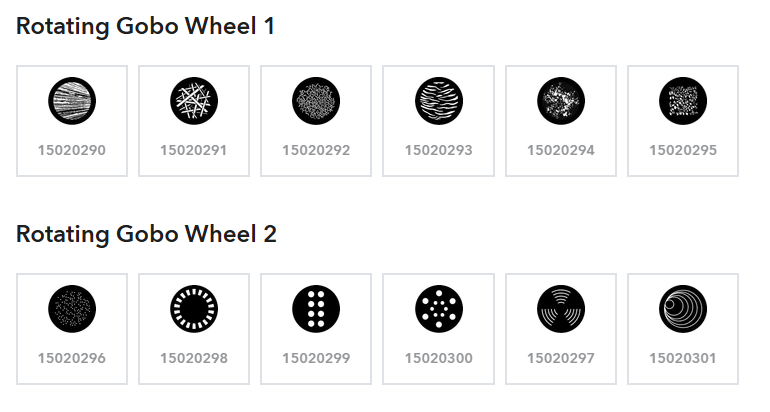
- Gobo Wheel 1 — 6 slots
- Gobo Wheel 2 — 6 slots
This provides a total of 12 serviceable gobo positions across both wheels.
Use the Gobo Service Screwdriver on the fixture to open its wheel-management interface.
From there, compatible gobo positions can be inspected, replaced or cleared.
Factory Gobos
Factory gobo items are accepted only when the selected wheel supports that design as part of its factory texture library.
Custom Gobos
Player-created engraved Custom Gobos can be installed in compatible serviceable positions without being restricted to the BMFL Spot’s original factory artwork.
Removing an installed gobo returns its item to the player.
Configured wheel contents are stored persistently with the fixture.
Focus Tool
The BMFL Spot is compatible with the Focus Tool.
This allows one or multiple BMFL Spot fixtures to be selected and aimed together using TRP’s multi-fixture focusing workflow.
Point Mode
All selected fixtures are aimed towards one selected position in the Minecraft world.
Two-Point Span Mode
Two world positions define a target span.
TRP spatially sorts the selected fixtures and distributes their aim points evenly between those positions.
The Focus Tool also provides:
- Auto Focus
- Auto Zoom
- Output Assist
- Manual Focus
- Manual Zoom
- Manual Intensity
The tool can store up to 32 compatible fixture targets at once.
RoboSpot
The BMFL Spot is compatible with TRP RoboSpot.
A RoboSpot station can bind BMFL Spot fixtures and provide a live world view from the selected fixture’s position.
The RoboSpot operator interface can control supported fixture functions including:
- Pan
- Tilt
- Fine movement
- Dimmer
- Shutter / Strobe
- Zoom
- Focus
- Iris
- Frost
- RGB colour selection
- Gobo selection
- Gobo rotation
- Other supported optical controls
The RoboSpot system also provides:
- Four position / control presets
- Four fixture groups
- Grouped, split and isolated operation
- Per-fixture X / Y calibration
- Independent active-camera selection
- Multiple control policies
One RoboSpot station can bind up to 12 compatible fixtures.
The presence of a control in the RoboSpot interface does not automatically mean every connected fixture implements that optical function.
FollowMe
The BMFL Spot is also compatible with FollowMe.
FollowMe allows the fixture to automatically aim towards:
- A player
- Another living entity
A configured FollowMe Tracker can control up to 12 compatible fixtures.
Available tracker options include:
- Tracking Enabled / Disabled
- Auto Focus
- Auto Zoom
- Fixture Target Selection
Auto Focus and Auto Zoom can be disabled individually so another control source can retain those values while FollowMe handles fixture movement.
The BMFL Spot must be loaded and have a valid DMX address before the tracking system can apply movement.
Flight Cases
There is currently no dedicated BMFL Spot flight case implemented in TRP.
Only fixture models with explicitly implemented matching cases can use TRP’s dedicated flight-case storage system.
Rigging & Mounting
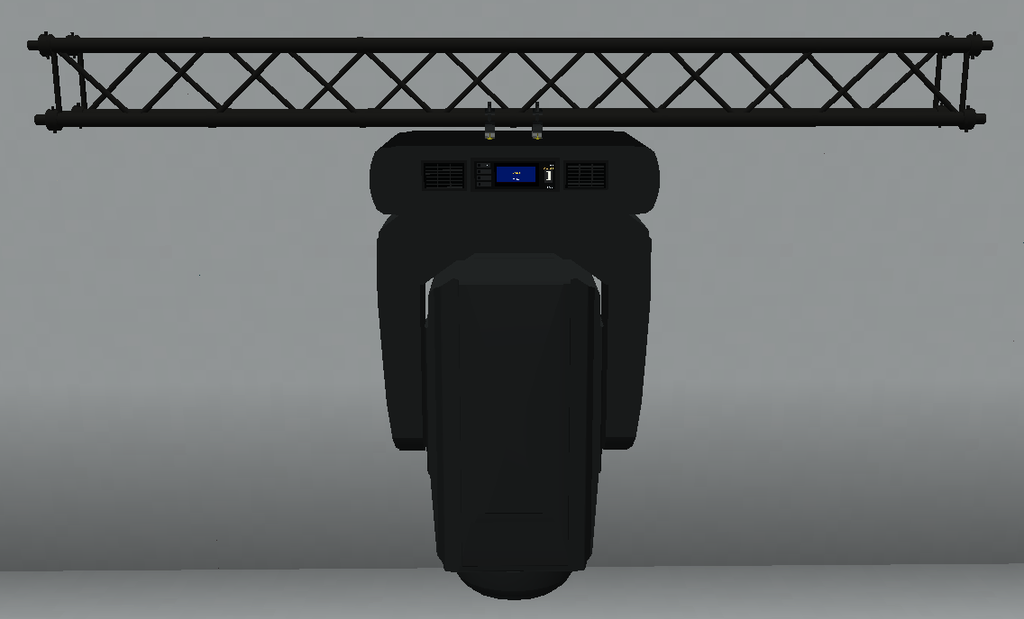
The BMFL Spot can be mounted on compatible TRP and recognised rigging structures.
Supported systems include:
- TRP F34 truss
- Theatrical truss
- Theatrical rigging pipes
- Recognised Theatrical Extra Lights structures
- Recognised SEF quad-truss variants
TRP’s F34 system supports appropriate:
- Top mounting
- Bottom mounting
- Side / rail mounting
- Compatible fixture orientations
The BMFL Spot also supports the Truss Mount Tool.
On compatible horizontal F34 side mounts, the physical fixture angle can be adjusted from:
0° → 120°
in:
15° increments
This modifies the physical rigging orientation and is independent from DMX Pan and Tilt.
Known Limitations
- No dedicated BMFL Spot flight case is currently available.
- Factory gobos remain restricted to compatible wheel libraries when using Custom Gobo Service.
- RoboSpot controls depend on the functions actually implemented by the fixture.
- FollowMe requires the fixture to be loaded and correctly addressed.
- Exact DMX channel-value ranges are not included unless separately validated against the complete personality implementation.
- The real BMFL Spot is now listed by ROBE as a discontinued product, although this does not affect its implementation or availability inside TRP.