


FOOTSIE2
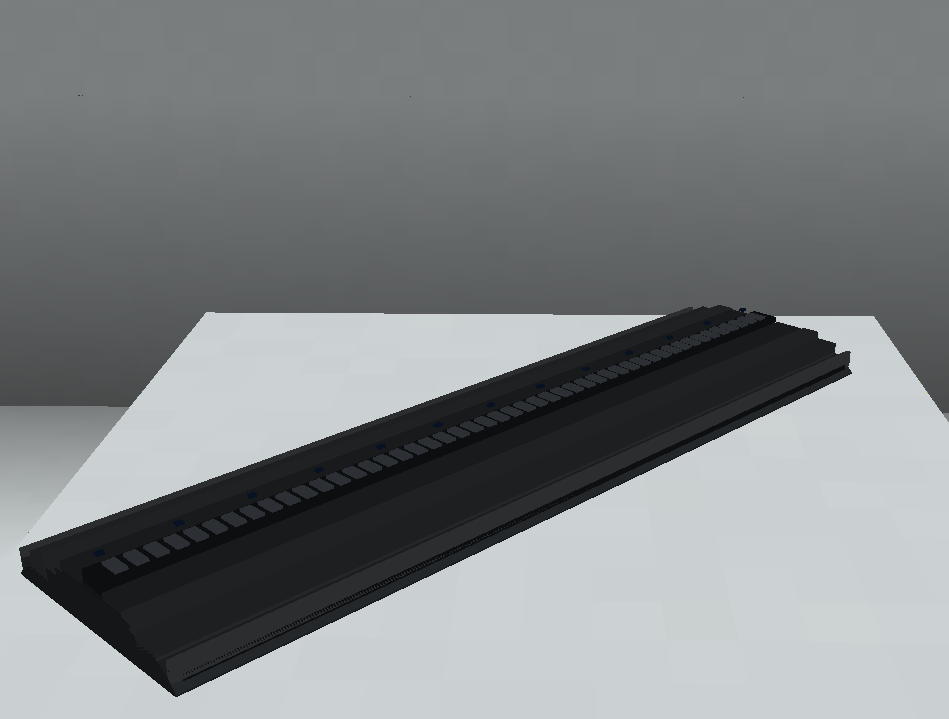

The FOOTSIE2 is an IP65 linear RGBW floor fixture implemented in Theatrical: Realistic Pack (TRP).
Unlike most fixtures in TRP, FOOTSIE2 is designed specifically for floor installation. Its Minecraft model is scaled proportionally to exactly one block in length, allowing multiple units to be positioned directly next to each other without gaps or overlap.
The fixture contains 48 RGBW emitters, divided into four independently controllable lighting zones, together with physical SPREAD shields, cable covers and an adjustable central LED module.
Official Resources
ROBE Product Page
ROBE FOOTSIE2
Official GDTF Profile — FOOTSIE2 RGBW
ROBE FOOTSIE2 RGBW on GDTF Share
ROBE provides official GDTF data for the FOOTSIE2 family, including the RGBW variant represented by TRP.
Overview
| Manufacturer | ROBE |
| Fixture Type | Linear Floor Wash |
| Light Source | RGBW |
| RGBW Emitters | 48 |
| Controllable Zones | 4 |
| DMX Modes | 3 |
| Default Mode | Mode 1: Simple |
| Maximum DMX Footprint | 49 channels |
| Custom Gobos | ❌ No |
| Focus Tool | ❌ No |
| RoboSpot | ❌ No |
| FollowMe | ❌ No |
| Flight Case | ❌ No |
| Survival-Friendly Carrying | ❌ No |
| Truss Mount Tool | ❌ No |
| Hanging Installation | ❌ No |
| Free Placement | ✅ Yes |
| Special End-to-End Placement | ✅ Yes |
DMX Modes
FOOTSIE2 provides three personalities:
| Mode | Personality | Channels |
|---|---|---|
| Mode 1 | Simple | 5 |
| Mode 2 | Standard | 36 |
| Mode 3 | Standard + PIP | 49 |
Mode 1: Simple is the default personality.
Mode 1 — Simple
5 channels
This is the default compact personality.
In this mode, FOOTSIE2 renders its output as one continuous rectangular wash extending across the complete LED strip.
Mode 2 — Standard
36 channels
Provides the fixture’s expanded zone-based control.
The physical LED strip is represented as four independent rectangular lighting zones.
Mode 3 — Standard + PIP
49 channels
The largest personality combines the Standard control set with the fixture’s additional 13 PIP marker channels.
Like Mode 2, the visible output is divided into four rectangular beams corresponding to the physical LED zones.
Implemented Functions
Depending on the selected personality, the TRP implementation includes:
- RGBW output
- Intensity control
- Four independently represented LED zones
- Rectangular wash rendering
- Individual zone output in the expanded personalities
- PIP marker control in Mode 3
- Physical SPREAD shield interaction
- Physical LED-module tilt
- Opening and closing cable covers
- Persistent fixture configuration
- Special end-to-end placement
FOOTSIE2 uses a different physical design and workflow from TRP’s moving-head fixtures.
LED Layout
The fixture contains:
48 RGBW emitters
arranged along the central lighting strip.
For the expanded personalities, these are represented as four independently controlled zones.
┌────────┬────────┬────────┬────────┐
│ Zone 1 │ Zone 2 │ Zone 3 │ Zone 4 │
└────────┴────────┴────────┴────────┘
Mode 1 combines the strip into one continuous rectangular output.
Modes 2 and 3 produce four separate rectangular beams whose source apertures correspond to the four physical zones.
Fixture Configuration
FOOTSIE2 uses the normal TRP fixture configuration system but has a unique physical access workflow.
The fixture includes:
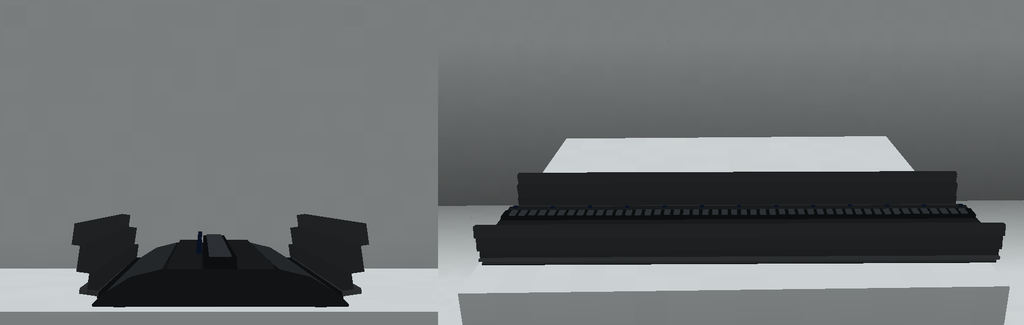
- Two outer cable covers
- Two inner SPREAD shields
- A tilting central LED module
The configuration panel is physically hidden while the outer cable covers are closed.
Opening the Configuration Panel
To access the fixture configuration:
- Sneak + Use the fixture to open both outer cable covers.
- Once both cable covers are open, use the fixture normally with an empty hand.
- The FOOTSIE2 configuration interface opens.
The standard fixture configuration provides access to settings such as:
- Theatrical Network
- DMX Universe
- DMX Address
- Fixture Personality
- Fixture display settings
- Other common TRP fixture configuration options
Configuration Card
The normal Theatrical Configuration Card workflow is supported.
However, on FOOTSIE2:
Both cable covers must be open before the Configuration Card can be used.
This follows the same physical-access behaviour as the fixture’s own configuration panel.
Cable Covers
FOOTSIE2 has two outer cable covers.
Use:
Sneak + Use
to open or close them.
Both covers operate together.
With the covers closed, normal empty-hand interaction does not open the configuration screen. Instead, it operates the fixture’s SPREAD shield and LED-angle system.
With both covers open, normal empty-hand use provides access to the configuration panel.
SPREAD Shields
FOOTSIE2 contains two inner SPREAD shields, one for each side of the fixture.
With the cable covers closed, normal empty-hand interaction raises or lowers the selected SPREAD shield.
Only one side may be raised at a time.
Before switching to the opposite side, the currently raised shield must first be lowered.
Automatic LED Tilt
Raising a SPREAD shield also adjusts the central LED module.
The LEDs physically tilt toward the selected shield.
This changes the direction of the corresponding light output, allowing the fixture to project diagonally rather than only vertically from the floor.
Lowering the shield returns the fixture from that adjusted state.
Floor Placement
FOOTSIE2 is designed exclusively as a:
Floor Fixture
It must remain supported from below and does not use the hanging workflow available to most other TRP luminaires.
Its long axis is initially aligned parallel to the player’s viewing direction when placed.
Free Placement
FOOTSIE2 supports TRP’s Free Fixture Placement system.
On ordinary horizontal surfaces, the exact cursor position can determine the fixture’s placement offset instead of forcing it to the centre of a Minecraft block.
The Free Placement system also provides a model-based preview before placement.
A valid location is represented with a green/teal preview, while an obstructed position is represented in red.
The resulting fixture pose is stored persistently and synchronised between server and clients.
End-to-End Placement
FOOTSIE2 has additional placement behaviour designed specifically for building continuous rows.
When placing another FOOTSIE2 while targeting an existing FOOTSIE2, TRP can snap the new fixture to the nearest end of the existing unit.
The new fixture preserves the placement pose of the existing chain.
Because the physical model is scaled to exactly one Minecraft block in length, consecutive FOOTSIE2 units can meet directly end-to-end without visible gaps or overlap.
This makes it easier to construct long continuous floor-lighting installations.
Focus Tool
FOOTSIE2 is not compatible with the Focus Tool.
Its physical output direction is controlled through its dedicated SPREAD shield and LED-tilt system rather than the normal multi-fixture Focus Tool workflow.
RoboSpot
FOOTSIE2 is not compatible with RoboSpot.
It cannot be selected as a RoboSpot camera or remotely operated through the RoboSpot followspot system.
FollowMe
FOOTSIE2 is not compatible with FollowMe.
It cannot be selected as a target in a FollowMe Tracker configuration.
Custom Gobos
FOOTSIE2 does not contain a serviceable gobo system.
It is therefore not compatible with:
- Gobo Service Screwdriver
- Factory gobo replacement
- Custom engraved gobos
Flight Cases
FOOTSIE2 has no dedicated Flight Case in the current TRP implementation.
Survival-Friendly Carrying
FOOTSIE2 is excluded from TRP’s Survival-Friendly physical fixture-carrying system.
Its empty-hand interactions are already used for its:
- Cable covers
- SPREAD shields
- LED-angle controls
and it therefore does not participate in the normal carried-fixture workflow.
Rigging & Mounting
FOOTSIE2 is a floor-only fixture.
It does not support:
- Hanging installation
- Omega Clamp rendering
- F34 hanging placement
- Side-rail mounting
- Truss Mount Tool
- Hanging from compatible Theatrical structures